In HubSpot, products represent the goods or services you sell. Building a product library allows you to quickly add products to deals, generate quotes, and report on product performance. The products endpoints allow you to manage this data and sync it between HubSpot and other systems. Products, along with companies, contacts, deals, tickets, line items, and quotes, are objects in the HubSpot CRM. Learn more about object properties, associations, relationships, and more in our Understanding the CRM Objects guide. Example use case: so that sales reps can easily add goods and services to deals, quotes, and more, use the products API to import your product catalog into HubSpot.

Create a product

To create a product make a POST request to crm/objects/2026-03/products. In the request body, include a properties object containing any product properties that you’d like to set on create. You can later update a product’s properties through a PATCH request to the same endpoint. To see all available product properties, make a GET request to the properties API. To retrieve product properties, the request URL will be /crm/properties/2026-03/products.
{
  "properties": {
    "name": "Implementation Service",
    "price": "6000.00",
    "hs_sku": "123456",
    "description": "Onboarding service for data product",
    "hs_cost_of_goods_sold": "600.00",
    "hs_recurring_billing_period": "P12M"
  }
}
Note that the value for hs_recurring_billing_period is formatted as P#M, where # is the number of months.

Tiered pricing

HubSpot supports tiered pricing, which allows you to charge different rates based on the quantity purchased. Tiered pricing requires a Commerce Hub subscription and a Commerce Hub seat. When creating a product with tiered pricing, use the following properties instead of the standard price property:
PropertyTypeDescription
hs_pricing_modelStringThe pricing model. Can be one of the following:
  • volume: one unit price applies to all units, determined by the total quantity purchased.
  • graduated: each tier’s price applies only to units sold within that tier.
  • stairstep: the total price is a flat fee based on the highest tier reached.

Learn more about tiered pricing types on HubSpot’s Knowledge Base.
hs_tier_rangesStringA JSON array (serialized as a string) defining the quantity ranges for each tier.
hs_tier_pricesStringA JSON array (serialized as a string) defining the price for each tier range.

Define tier ranges

The hs_tier_ranges property is a JSON array serialized as a string. Each object in the array defines one tier’s quantity range, referenced by its zero-based index. The final tier can be left open-ended by omitting the end value:
"[{\"start\":0,\"end\":99},{\"start\":100,\"end\":199},{\"start\":200}]"
This example defines three tiers: quantities 0–99 (index 0), 100–199 (index 1), and 200+ (index 2).

Define tier prices

The hs_tier_prices property is a JSON array serialized as a string. Each entry’s index field references the corresponding range by its zero-based position in hs_tier_ranges. Every range must have a price entry:
"[{\"index\":0,\"price\":100},{\"index\":1,\"price\":80},{\"index\":2,\"price\":60}]"
If your account has multiple currencies enabled, each entry must include a currency field. You don’t need to provide prices for every currency your account supports, but each currency you include must have an entry for every range:
"[{\"index\":0,\"price\":100,\"currency\":\"USD\"},{\"index\":1,\"price\":80,\"currency\":\"USD\"},{\"index\":2,\"price\":60,\"currency\":\"USD\"},{\"index\":0,\"price\":50,\"currency\":\"GBP\"},{\"index\":1,\"price\":40,\"currency\":\"GBP\"},{\"index\":2,\"price\":20,\"currency\":\"GBP\"}]"

Single-currency example

The following example creates a volume-priced product with three tiers:
{
  "properties": {
    "name": "Single Currency Tiered Product",
    "hs_pricing_model": "volume",
    "hs_tier_ranges": "[{\"start\":0,\"end\":99},{\"start\":100,\"end\":199},{\"start\":200}]",
    "hs_tier_prices": "[{\"index\":0,\"price\":100},{\"index\":1,\"price\":80},{\"index\":2,\"price\":60}]"
  }
}

Multi-currency example

For accounts with multiple currencies, include a currency field on each tier price entry:
{
  "properties": {
    "name": "Multicurrency Tiered Product",
    "hs_pricing_model": "volume",
    "hs_tier_ranges": "[{\"start\":0,\"end\":99},{\"start\":100,\"end\":199},{\"start\":200}]",
    "hs_tier_prices": "[{\"index\":0,\"price\":100,\"currency\":\"USD\"},{\"index\":1,\"price\":80,\"currency\":\"USD\"},{\"index\":2,\"price\":60,\"currency\":\"USD\"},{\"index\":0,\"price\":50,\"currency\":\"GBP\"},{\"index\":1,\"price\":40,\"currency\":\"GBP\"},{\"index\":2,\"price\":20,\"currency\":\"GBP\"}]"
  }
}

Retrieve with tiered pricing properties

To retrieve a product with all tiered pricing properties included, make a GET request to: /crm/objects/2026-03/products/{productId}?properties=hs_pricing_model,hs_tier_ranges,hs_tier_prices The response will include the three tiered pricing properties alongside the standard product properties:
{
  "id": "43439884383",
  "properties": {
    "createdate": "2026-03-31T18:53:49.908Z",
    "hs_lastmodifieddate": "2026-03-31T18:53:49.908Z",
    "hs_object_id": "43439884383",
    "hs_pricing_model": "graduated",
    "hs_tier_prices": "[{\"index\":0,\"price\":100,\"currency\":\"USD\"},{\"index\":1,\"price\":90,\"currency\":\"USD\"},{\"index\":2,\"price\":80,\"currency\":\"USD\"}]",
    "hs_tier_ranges": "[{\"start\":0,\"end\":99},{\"start\":100,\"end\":199},{\"start\":200}]"
  },
  "createdAt": "2026-03-31T18:53:49.908Z",
  "updatedAt": "2026-03-31T18:53:49.908Z",
  "archived": false
}

Associate products

Products themselves can’t be associated with other CRM objects. However, to associate a product’s information with a deal or a quote, you can create a line item based on that product. Line items are individual instances of products, and are a separate object from products so that you can tailor the goods and services on a deal or quote as needed without needing to update the product itself. For example, if you’re putting together a deal where one of your products is being sold, you’d first create a line item from the product, then associate it with the deal. You can either do this with two separate calls, or with one call that creates and associates the line item. Both options are shown below.
Please note:Line items belong to one single parent object. If associating objects, line items should be individual to each object. For example, if you’re creating a deal and a quote, you should create one set of line items for the deal, and another set for the quote. This will help streamline CRM data across objects and prevent unexpected data loss when needing to modify line items. For example, deleting a quote will also delete the quote’s line items. If those line items are also associated with a deal, the deal’s line items will also be deleted.

Create and associate a line item (multiple calls)

First, you’ll create a line item based on a product with the ID of 1234567. For a full list of available line item properties, make a GET request to the properties API. The URL for line items would be crm/properties/2026-03/line_items. Because you’re create the line item from an existing product, it will inherit property values from the product, such as price.
{
  "properties": {
    "quantity": 1,
    "hs_object_id": "1234567", //the object ID of the product
    "name": "New line item (product-based)"
  }
}
The response will return a line item ID which you can use to associate it with a deal using the associations API. For this example, assume that the returned line item ID is 7791176460. To associate the line item with an existing deal (ID: 14795354663), you’ll make a PUT request to /crm/objects/2026-03/line_items/7791176460/associations/default/deals/14795354663. This request uses the default association type. A 200 response will return information similar to the following:
{
  "status": "COMPLETE",
  "results": [
    {
      "from": {
        "id": "14795354663"
      },
      "to": {
        "id": "7791176460"
      },
      "associationSpec": {
        "associationCategory": "HUBSPOT_DEFINED",
        "associationTypeId": 19
      }
    },
    {
      "from": {
        "id": "7791176460"
      },
      "to": {
        "id": "14795354663"
      },
      "associationSpec": {
        "associationCategory": "HUBSPOT_DEFINED",
        "associationTypeId": 20
      }
    }
  ],
  "startedAt": "2023-12-21T20:06:52.083Z",
  "completedAt": "2023-12-21T20:06:52.192Z"
}
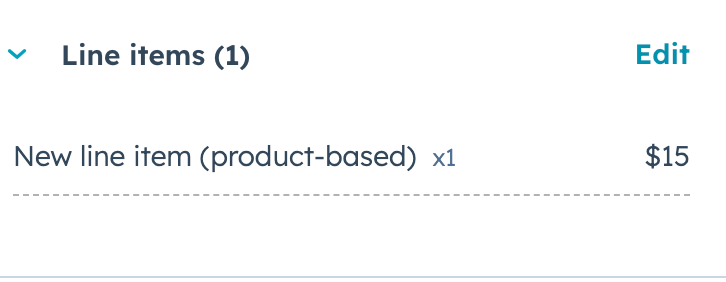
In HubSpot, the deal record will display the line item in the Line items card.
deal-record-line-item-association

Create and associate a line item (single call)

To create a line item from an existing product and associate it with a deal using a single call, you can include an associations array in the line item create request. To create the line item, make a POST request to crm/objects/2026-03/line_item. Your request body will look similar to the following. Note that the associationTypeId for the line item-deal association is 20. Learn more about association types between different types of CRM records.
{
  "properties": {
    "quantity": 1,
    "hs_object_id": "1234567", //the object ID of the product
    "name": "New line item (product-based)"
  },
  "associations": [
    {
      "to": {
        "id": "14795354663"
      },
      "types": [
        {
          "associationCategory": "HUBSPOT_DEFINED",
          "associationTypeId": 20
        }
      ]
    }
  ]
}
A 200 response will return details about the new line item. In HubSpot, the deal record will display the line item in the Line items card.
deal-record-line-item-association
Last modified on March 31, 2026