
Supported products
Supported products
Requires one of the following products or higher.
 Marketing Hub -Enterprise
 Sales Hub -Enterprise
 Service Hub -Enterprise
 Content Hub -Enterprise
 Data Hub -Enterprise
Scope requirements
Scope requirements
Define the custom event
To send event occurrence data to HubSpot, you first need to define the event. You can define events using the custom event definition API or if you have an Enterprise subscription, create the event in HubSpot. Once you’ve set up your custom event, you can send data to it through the API or by customizing your HubSpot tracking code.Send event occurrence data
To send event data to HubSpot, make aPOST request to /events/v3/send with your event data in the request body. Before sending event data, review the limits below, as exceeding these limits will result in an error.
| Parameter | Type | Description |
|---|---|---|
eventName Required | String | The fully qualified name of the event (fullyQualifiedName). You can find this by querying your existing event definitions or within the HubSpot app. The value will be formatted as pe{HubID}_{name}. |
objectId (or other identifier) Required | String | An identifying value for the record with which to associate the event occurrence. Learn more about the identifier options to associate records with event occurrences. |
occurredAt | String | By default, HubSpot sets the event occurrence timestamp to the time the request was sent. To specify the time of an event occurrence (e.g., backdating event data), include a ISO 8601 string or UNIX-formatted timestamp in milliseconds as the occurredAt value. |
properties | Object | The event properties to set or update. Learn more about custom event properties. |
Link event occurrences to records
A unique identifier is a property that differentiates one record in the CRM from another, even if they have otherwise identical information. To identify which record to link to an event occurrence, you must include a unique value in your request to send an event occurrence. The options for unique identifiers are included in the table below, from highest to lowest priority. The priority order refers to the order in which values will be checked for a matching record if you’ve included multiple identifying values.| Field | Priority | Description |
|---|---|---|
customMatchingId property | 1 | An event property that uniquely identifies an object record via a matching ID. To use this method, include the eventPropertyName property in the properties field, with the object record’s value for the targetObjectPropertyName. This is set up when defining a custom event. You can retrieve a custom event definition to confirm if there’s a custom matching ID property. |
objectId | 2 | The record ID (recommended). |
email | 3 | The contact email address (contacts only). |
utk | 4 | The contact usertoken (contacts only). |
- By objectId
- By customMatchingId
- By email
Retrieve event occurrence data
To retrieve event data, make aGET request to /events/v3/events.
- To return all event occurrences for a specific event, include the
eventTypeparameter along with the internal event name (e.g.,pe123456_custom_event). You can retrieve all event types using the event analytics API. - To return event occurrences for a specific record, include the
objectTypeparameter along with either theobjectIdorobjectProperty.<property>parameters. TheobjectTypespecifies the type of object (e.g.,contact), while the other parameters specify the unique identifier value for the record (either record ID oremailfor contacts). For example, to retrieve all events that occurred for a specific contact, your request URL could be/events/v3/events?objectType=contact&objectId=111111or/events/v3/events?objectType=contact&objectProperty.email=bilbo@shire.com. - To filter the results by event occurrences with a specific event property value, include the
property.<propertyName>parameter. For example, to retrieve page visit events for your home page, your request URL might be:/events/v3/events?eventType=e_visited_page&property.hs_page_title=home
For property values with spaces, replace the spaces with either
%20 or +.
For example: property.hs_page_title=home+page.Set and update event properties
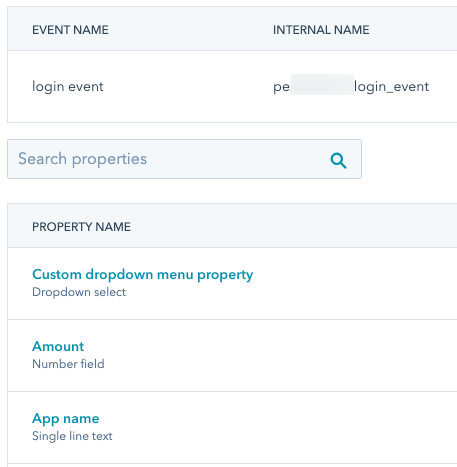
Event occurrence data is stored in event properties. Event properties may include default event properties and custom-defined properties. When sending event data, include aproperties object with key-value pairs for the properties you want to update along with the property values to store. The types of values you send depend on the type of event property. Refer to the table of supported event property types when formatting property values.
- For default event properties, review the table of default properties and their types.
- Retrieve the custom object definition with the
includePropertiesparameter set totrue. - View a custom event’s available properties in your HubSpot account:
- Navigate to Data Management > Custom Events.
- In the table, click the name of the event.
- At the top, click the Properties tab.
- In the properties table, view the property type under the name of the property.
Limits
When sending event data, exceeding any of the following limits will result in a failed request.- The property label and internal name are limited to 50 characters.
- URL and referrer properties can receive up to 1,024 characters, while all other properties can receive up to 256 characters.
- Each event occurrence can contain data for up to 50 properties.
- Property internal names must start with a letter and contain only lowercase letters a-z, numbers 0-9, and underscores.
- Properties with the same internal name after lowercasing are considered duplicates, and only one of the properties will be used on occurrence. HubSpot will sort in ascending lexicographical order and keep the last property seen among the first 50 properties.
- There is a limit of 500 unique event definitions per account.
- There is a limit of 30 million event occurrences per month.
- The send custom event occurrences endpoint supports up to 1250 requests per second.
- The custom event occurrence batch endpoint supports batches of 500.
Attribution reporting
JavaScript events such as clicked element and visited URL events are automatically populated with asset type and interaction data for attribution reporting. To include the same data for manually tracked events, you’ll need to manually include the data in the request body using event properties. Learn more about analyzing custom events. Below, learn about the available values for asset types and interaction sources, along with example requests.Asset type
To attribute a specific asset type to a custom behavioral event request, include thehs_page_content_type property in the request body. For example:
You can also use the
hs_asset_type property. If both hs_page_content_type and hs_asset_type are included in one request, hs_page_content_type will override the hs_asset_type value.| Value | Description |
|---|---|
STANDARD_PAGE | An interaction with a website page. |
LANDING_PAGE | An interaction with a landing page. |
BLOG_POST | An interaction with a blog post. |
KNOWLEDGE_ARTICLE | An interaction with a knowledge base article. |
| Value | Description |
|---|---|
AD | An interaction with an ad, such as a Facebook or Google ad. |
CALL | An interaction with a call. |
CONTACT_IMPORT | An interaction via a contact import. |
CONVERSATION | An interaction related to a HubSpot conversation. |
CUSTOM_BEHAVIORAL_EVENT_NAME | The internal name of a custom event, such as pe123456_manually_tracked_event. |
EMAIL | An interaction with an email. |
EXTERNAL_PAGE | An interaction with an external page. |
INTEGRATIONS | An interaction via an integration. |
MARKETING_EVENT | An interaction with a marketing event. |
MEDIA_BRIDGE | An interaction via the media bridge. |
MEETING | An interaction with a meeting. |
SALES_EMAIL | An interaction with a 1:1 sales email. |
SEQUENCE | An interaction with a sequence. |
SOCIAL_POST | An interaction with a social media post. |
OTHER | An interaction with an asset not in one of the above categories. |
Asset title
To attribute a custom event to an asset, include thehs_page_title or hs_asset_title property in your request with the name of the asset formatted as a string. For example:
hs_page_title:
Interaction sources
To attribute a custom behavioral event to a specific source, include thehs_touchpoint_source property in your request with one of the following values:
| Value | Description |
|---|---|
CONVERSATION | The interaction source is a conversation. |
DIRECT_TRAFFIC | The interaction source is direct traffic. |
EMAIL_MARKETING | The interaction source is a marketing email. |
HUBSPOT_CRM | The interaction source is the HubSpot CRM. |
INTEGRATION | The interaction source is an integration. |
MARKETING_EVENT | The interaction source is a marketing event. |
OFFLINE | The interaction source is offline. |
ORGANIC_SEARCH | The interaction source is organic search. |
OTHER_CAMPAIGNS | The interaction source is from an uncategorized campaign. |
PAID_SEARCH | The interaction source is a paid search ad. |
PAID_SOCIAL | The interaction source is a paid social ad. |
REFERRALS | The interaction source is a referral. |
SALES | The interaction source is sales. |
SOCIAL_MEDIA | The interaction source is social media (not a paid social ad). |