The Rich Text Editor inside of custom modules now provides the ability for developers to remove components from the configuration toolbar.
As a developer, there are times when WYSIWYG editors provide functionality that, when used incorrectly, can hinder the goal of a unified brand and cause content design and flow issues. The Rich Text Editor inside of custom modules now provides the ability for developers to remove components from the configuration toolbar through the enabled_features property inside of the fields.json file.
Note: The following applies to custom modules utilizing the rich text field in local development only. Using this feature will not disable the functionality of options removed from the Rich Text Editor, just the display of the options. This is for backward compatibility reasons so existing content is not affected.
How to use enabled_features
In your fields.json file where you have your rich text field object, you can enable certain features by adding the valid toolbar options in an array to the enabled_features property as illustrated below:
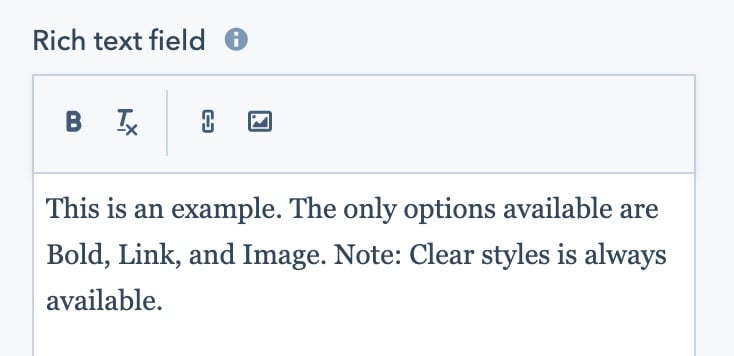
// Rich text field with only Bold, Link, and Image available in the Toolbar{ "name": "description", "label": "Description", "required": false, "locked": false, "type": "richtext", "default": null, "enabled_features": ["bold", "link", "image"]}
The content editor would then see the rich text editor with only the included options enabled as illustrated in the image below:
Note: Some features, such as the “Clear Styles” button which allows you to revert to the default styling for the editor, will always be enabled and cannot be removed. If the enabled_features property is omitted, all features will be shown.
Feature listings
Below is a list of features which can be enabled individually when using the enabled_features property.
Groups of controls
Option
Description
colors
Text color and background color controls.
fonts
Font family and font size controls.
indents
Outdent and indent controls.
lists
Bulleted and numbered lists controls.
standard_emphasis
Bold, italic, and underline controls.
advanced_emphasis
Strikethrough, superscript, subscript, and code format controls.
glyphs
Emoji, special character, and icon controls. Not supported in email modules. To add the emoji picker to email modules, use emoji instead.
Text Formatting
Option
Description
block
Shows the style switcher dropdown menu.
font_family
Shows the font switcher dropdown menu.
font_size
Shows the font size dropdown menu.
bold
Shows the bold button.
italic
Shows the italics button.
underline
Shows the underline button.
text_color
Shows the text color button.
background_color
Shows the background color button.
alignment
Shows the alignment button.
bulleted_list
Shows the bulleted list button.
numbered_list
Shows the numbered lists button.
lineheight
Shows the line-height button.
outdent
Shows the outdent button.
indent
Shows the indent button.
strikethrough
Shows the strikethrough button.
superscript
Shows the superscript button.
subscript
Shows the subscript button.
code_format
Shows the code format button.
Insert Buttons
Option
Description
link
Shows the link button.
image
Shows the image button. Not supported in email modules.
emoji
Shows the emoji button.
personalize
Shows the personalize toolbar item.
cta
Shows the call-to-action menu item under the insert menu.
embed
Shows the embed menu item under the insert menu.
video
Shows the video menu item under the insert menu.
table
Shows the table menu item under the insert menu.
charmap
Shows the special character menu item under the insert menu.
anchor
Shows the anchor menu item under the insert menu.
hr
Shows the horizontal line menu item under the insert menu.
nonbreaking_space
Shows the non-breaking space menu item under the insert menu.
icon
Shows the icon menu item under the insert menu.
Advanced Options
Option
Description
source_code
Shows the source code menu item under the advanced menu.
visual_blocks
Shows the show blocks menu item under the advanced menu.
Last modified on February 10, 2026
Was this page helpful?
Assistant
Responses are generated using AI and may contain mistakes.